 KoetojiRecord your voice. Read it back.
Koetoji records your voice and turns it into text using on-device speech recognition. Audio and text stay together as a single entry on your device, and you choose what to share.
In preparationNot yet available on the App Store or Google Play. Release date and pricing have not been announced.
From voice to text, into a single record
Voice
Text
Record on device
Speech-to-text relies solely on the built-in on-device speech recognition provided by the OS. It never switches to cloud speech recognition.
Recordings, transcripts, and the search index are stored encrypted on your device. No account registration is required.
On iOS, transcription pauses when the app is in the background or the screen turns off. See Transcription Requirements for details.
Explanatory animation illustrating how it works, not actual recognition results.
From recording to sharing
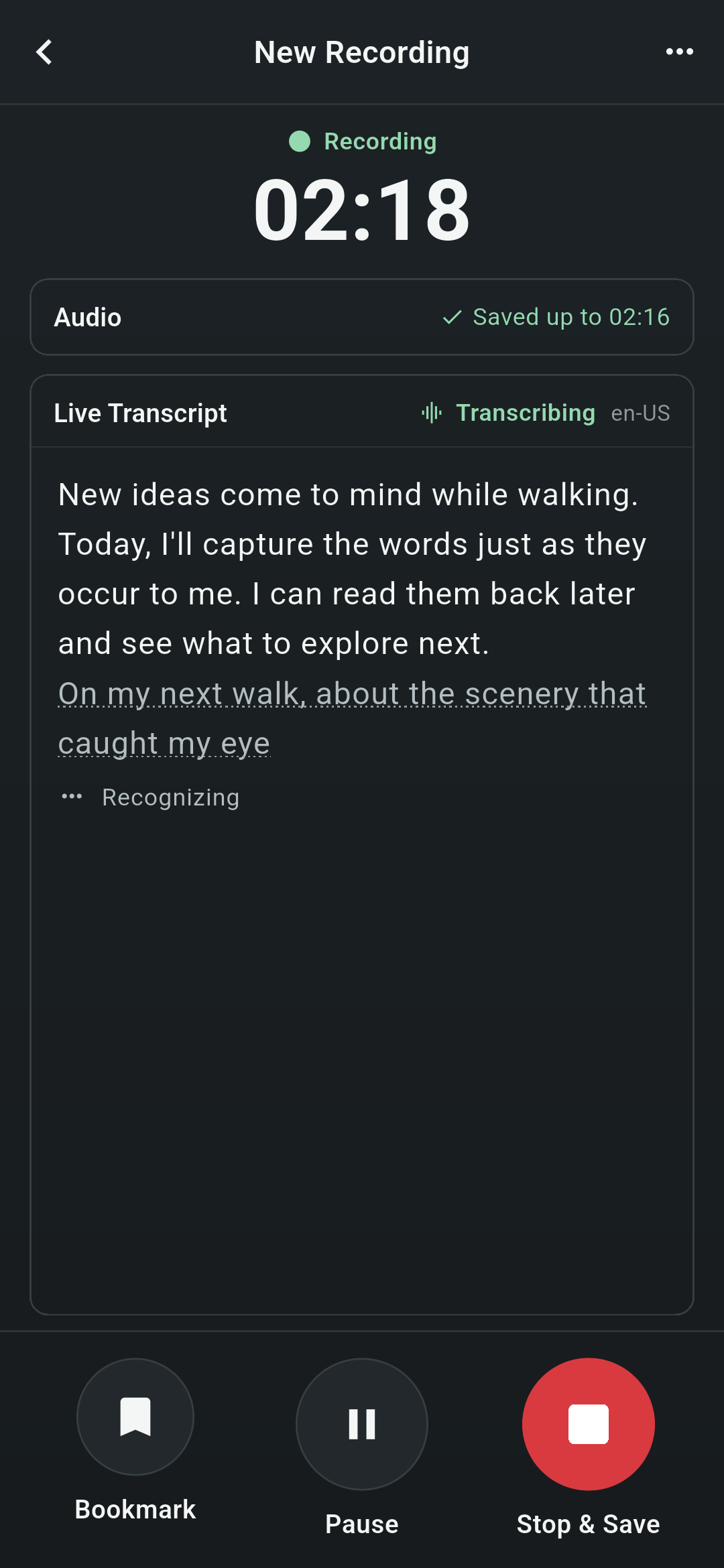
Record
Words appear as you speak. Unconfirmed text is shown with a dotted underline, and you can bookmark moments you want to listen to again later.
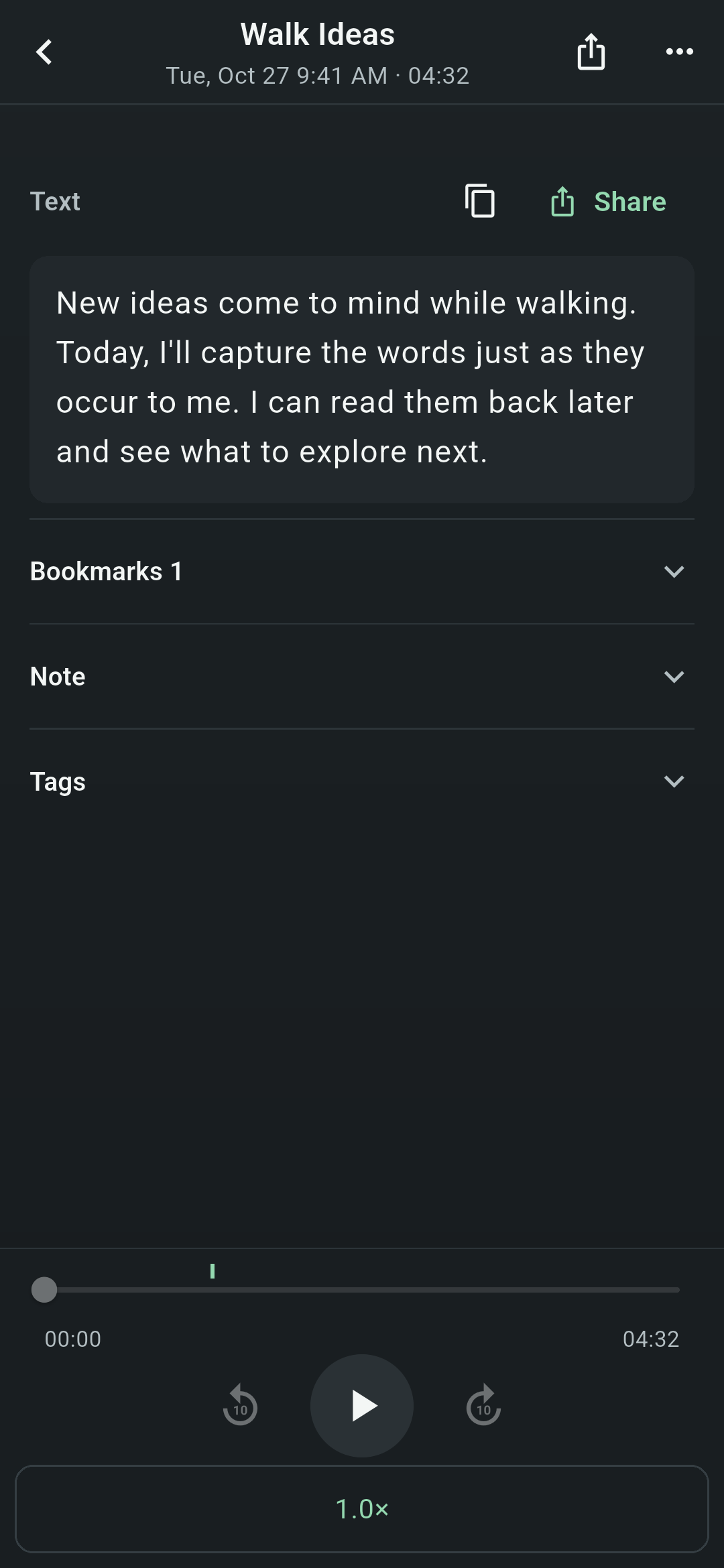
Read
Open a saved entry to view the transcript and audio side by side on one screen. Read along while listening, or copy the text.
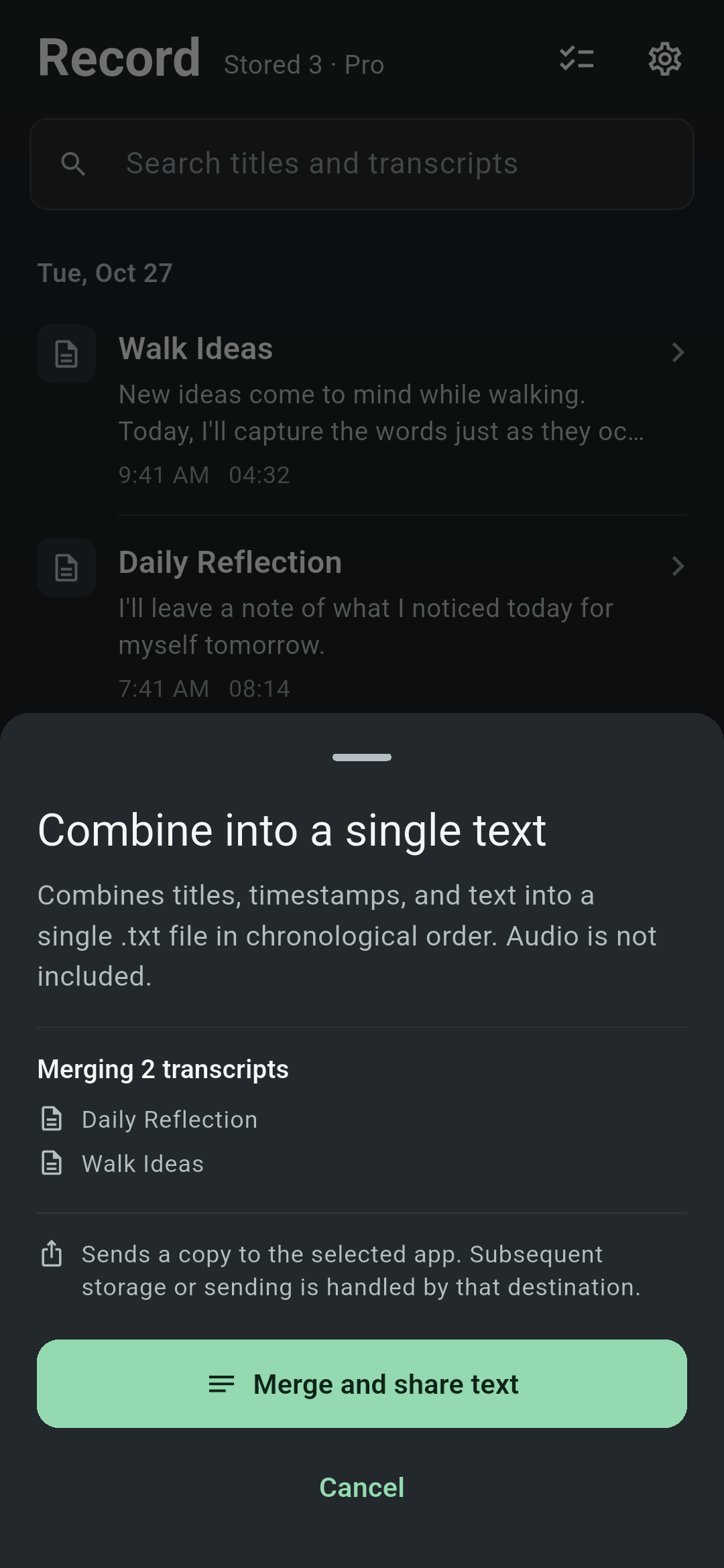
Share
Select and share audio recordings (WAV) or transcripts one by one. With Pro, you can combine multiple selected transcripts into a single .txt file ordered by recording date and time. Audio is not included.
All screens show actual app views using sample entries. They do not represent transcription accuracy.
Where your voice and text live
Built to keep your recordings and text right on this device.
Only the copies you select are shared. The receiving app or service may send the content to the cloud or an AI service.
- What is not in the app
- There is no account registration, advertising, analytics via Google Analytics, or crash reporting via Crashlytics. Recordings and text are never automatically sent to the developer.
- When network access may occur
- When the OS prepares speech recognition models, when purchasing Pro, or when restoring purchases.
- After you share
- How a shared copy is stored or transmitted depends on the receiving app or service. Once shared, copies cannot be recalled.
- What cannot be recovered
- Recordings cannot be recovered if your device is lost or damaged, the encryption key is lost, or the app is deleted. There is no cross-device sync, device-to-device migration, or recovery by the developer. Please export and back up any entries you wish to keep using the share feature.
Handling details (such as temporary files for sharing)
- Transcription
- Uses only the built-in on-device speech recognition provided by the OS. It never switches to cloud speech recognition.
- Storage
- Recordings, transcripts, and the search index are stored encrypted on your device. No app account registration is required.
- What is not in the app
- There are no ads, no Google Analytics tracking, and no Crashlytics crash reporting. Recordings and text are never sent automatically to the developer.
- Sharing
- Only the recordings (WAV) or text you explicitly select are shared. The receiving app or service may send the content to the cloud or an AI service. Temporary files created for sharing text are unencrypted and are deleted at the next app launch or share action at least 24 hours after creation. They are not deleted at the exact 24-hour mark.
- Network activity
- Network communication may occur when the OS prepares speech recognition models, or when purchasing or restoring Pro.
- Keeping your data
- Recordings cannot be recovered after device loss or failure, encryption key loss, or app deletion/uninstallation. The operator cannot restore them either. There is no cross-device sync or device migration. Export and back up any recordings you want to keep via Share.
Website analytics is a site-wide mechanism separate from the app and follows regional consent settings. For details, see the Website Privacy Policy (Japanese).
Transcription Requirements
Transcription requires a compatible device, language, and speech model. Targets iOS 18+ and Android 13+. Android 12 and 12L support audio recording only.
Because transcription relies on OS speech recognition, what works varies by device and OS.
| Device | What works |
|---|---|
| iOS 18 or later | Recording and on-device transcription. If the app moves to the background or the screen turns off, transcription stops even while recording continues, and resumes when you return to the app. Unrecognized sections while paused are not transcribed afterward. |
| Android 13 or later | Recording and on-device transcription. However, the device's speech recognition service must support recorded audio input, recognition models, and the spoken language. |
| Android 12 / 12L | Audio recording only. On-device transcription is not available. |
- The app interface supports 15 languages. Available transcription languages depend on the languages supported by your OS and device speech recognition.
- Recording with the screen off may also stop due to the OS, other apps, or phone calls.
Check steps are summarized in Support.
Free & Pro
Store up to 5 playable recordings for free. Delete an entry to reuse its slot.
Free
- Keep up to 5 playable recordings
- Delete a recording to reuse its slot
- No time limit on use
ProPlanned as a one-time purchase
- No limit on stored recordings (subject to available device storage and other limits)
- Organize recordings with tags
- Combine and share multiple transcripts as a single .txt file
Pricing will be shown on the store when distribution begins.
Try on your device before buying
Transcription support varies by device, OS, and spoken language. Before buying Pro, use the 5 free slots to check whether transcription works with your usual device and language.
About restoring purchases
After changing devices or reinstalling, restore your purchase inside the app using the same store account used for the original purchase. This applies to valid Pro purchases on that account. If restoration does not work, contact Support before purchasing again.
Restoring a purchase restores Pro entitlement only; it does not restore recordings or transcripts. Purchases from a different app store or from Mute Pad cannot be transferred.
For details, see the Terms of Use.
Relationship to Mute Pad
Koetoji is a new, separate app from Mute Pad (Japanese) for Android. Mute Pad will continue as a separate app. Because this is not a replacement, recordings and purchased rights from Mute Pad do not carry over to Koetoji.